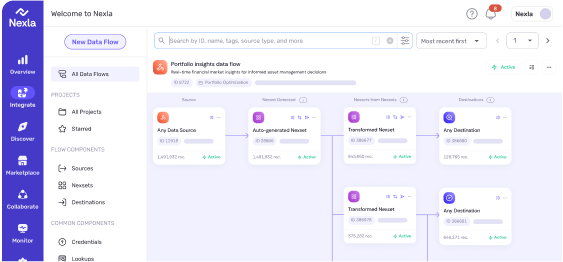
At Nexla, we built Express—an AI agent that helps users construct complex data engineering workflows through conversation. Companies like DoorDash, LinkedIn, Instacart, and Johnson & Johnson use Nexla to orchestrate large-scale data pipelines, and Express makes that power accessible through natural language.
But we quickly ran into a fundamental problem: chat-based interfaces are terrible for structured work.
When you’re configuring a Snowflake data source, you need to provide connection details, authentication credentials, table mappings, scheduling parameters, and transformation logic. Some fields are required. Others are optional depending on previous choices. Some can be pre-filled from context. A back-and-forth text conversation for this kind of structured input feels like filling out a tax form over the phone.
We believed agent UX didn’t have to suck. In fact, it could be delightful. So we built a generative UI system that lets our AI agent render rich, interactive components directly into the chat flow—forms with validation, OAuth flows, data explorers, visual flow canvases—all generated dynamically based on what the user is trying to accomplish.
The JSON Forms Detour
Our first instinct was to use JSON Forms—a declarative schema format that many teams reach for when they need dynamic form generation. For a platform with over 400 connectors, each with unique configuration requirements for credentials, sources, and sinks, this seemed like a natural fit.
It wasn’t.
The verbosity of JSON Forms schemas became a liability when we tried to generate them with LLMs. The format is extremely explicit, requiring you to define every possible field upfront with all their validation rules and UI hints. This led to frequent hallucinations—the model would invent fields, misapply validation rules, or generate malformed schemas that broke rendering.
More fundamentally, JSON Forms are deterministic. Once you define a form schema, that’s what the user sees. Every field, every time. There’s no room for intelligent pre-filling based on conversation history, no conditional rendering that adapts to what the user has already told you, no way to hide irrelevant fields based on their stated intent.
We needed the agent to construct the right UI for the situation, not just pick from a fixed menu of forms.
The XML Breakthrough
We made a counterintuitive choice: we defined our UI components in XML and made them part of the agent’s system prompt.
Here’s what a generative UI element looks like when the agent creates it:
<express-dynamic-ui>
    <metadata
        title="Configure your Snowflake Source"
        description="Enter your connection details"
        submit-label="Create Source" />
    <ui-section>
        <form>
            <form-section
                id="connection-details"
                title="Connection Details"
                required="true">
                <input
                    id="account-identifier"
                    type="text"
                    label="Account Identifier"
                    placeholder="e.g., xy12345.us-east-1"
                    required="true"
                />
                <input
                    id="warehouse"
                    type="text"
                    label="Warehouse"
                    value="COMPUTE_WH"
                    required="true"
                />
                <select
                    id="auth-method"
                    type="radio-group"
                    label="Authentication Method"
                    required="true">
                    <option value="password">Password</option>
                    <option value="key-pair">Key Pair</option>
                    <option value="oauth">OAuth</option>
                </select>
            </form-section>
        </form>
    </ui-section>
    <validation-rules>
        <rule
            type="dependency"
            when-field="auth-method"
            when-equals="oauth"
            then-field="warehouse"
            then-hidden="true"
        />
    </validation-rules>
</express-dynamic-ui>
The agent doesn’t just pick from pre-built forms—it constructs these XML structures on the fly based on what you’re trying to do, what you’ve already told it, and what information it still needs.
Why XML? Three reasons:
LLMs are better at it. In our testing, Claude produced significantly more accurate, well-formed UI definitions in XML than in JSON Forms schemas. The structure maps more naturally to how these models represent hierarchical content.
Streaming works cleanly. Our FastAPI backend streams these elements over WebSockets to the React frontend. With XML, the UI can begin parsing and rendering components as they arrive—even with incomplete tags—rather than waiting for the entire payload. The user sees forms materializing in real-time as the agent generates them.
Conversion to React is straightforward. Our frontend maps XML elements directly to JSX components with all their interactive behavior pre-built. A <datetime-picker> becomes a rich date/time component with validation. A <mapping-table> becomes an interactive field mapper. The agent doesn’t need to think about React—it just declares what the user needs.
Making Forms Intelligent
The real power comes from letting the agent be smart about what it shows you.
Say you’re setting up a BigQuery source and you mention, “I need to pull data from the customer_events table in our analytics project.” The agent can:
- Pre-fill the project ID field based on your organization’s context
- Infer the authentication method from your previous credential setups
- Hide optional scheduling fields if you indicated this is a one-time sync
- Conditionally show or hide fields based on the authentication method you select
This is captured in validation rules that the agent generates alongside the form:
<validation-rules>
    <rule
        type="dependency"
        when-field="schedule-precision"
        when-equals="custom"
        then-field="schedule-frequency"
        then-value="once"
    />
    <rule
        type="dependency"
        when-field="auth-method"
        when-equals="oauth"
        then-field="json-credentials"
        then-hidden="true"
    />
</validation-rules>
Forms adapt to choices in real-time. Pick “OAuth” as your authentication method, and the password field disappears. Select “custom” for scheduling precision, and the frequency dropdown automatically sets to “once” and locks.
OAuth Without the Headache
One of the most satisfying applications of this pattern is OAuth credential creation. Traditionally, setting up OAuth credentials for a data source involves:
- Finding the connector’s OAuth configuration
- Registering an app with the provider
- Configuring redirect URIs
- Handling the OAuth dance
- Storing the resulting tokens
With generative UI, the agent can inject an <oauth-credential-button> directly into the conversation:
<oauth-credential-button
    connector="google-drive"
    scopes="drive.readonly"
    redirect-uri="https://express.nexla.com/oauth/callback"
/>
The React component handles the rest. Click the button, get redirected to Google’s auth flow, come back to Express with your tokens securely exchanged, and continue configuring your source—all without leaving the conversation context.
The Architecture
Our system has three main layers:
The Agent Layer receives user messages, maintains conversation history, and has access to an XSD schema that defines all available UI components. Based on the current task and conversation context, it decides when to generate UI elements versus plain text responses. It streams XML over WebSockets as it generates.
The Parsing Layer lives in the React frontend and handles the complexity of consuming partial XML streams, maintaining state as components arrive, and mapping XML elements to their corresponding React components.
The Component Layer is our library of pre-built React components—forms, tables, buttons, explorers, canvases—each with rich interactive behavior, validation, and business logic baked in. The agent doesn’t need to think about implementation details; it just declares intent.
Beyond forms, we’ve built specialized components for Nexla-specific workflows:
- Credential Explorers that let you browse and test database schemas, API endpoints, or file systems before committing to a configuration
- Mapping Tables for defining field transformations between sources and destinations, with type validation and auto-suggestions
- Flow Canvases that visualize the data pipeline you’re building in a rich, interactive diagram
The agent decides when each of these is appropriate and renders them inline into the chat.
The Impact
Express is still young—but early qualitative signals and reduced barriers to entry for data engineering have been striking.
Gobi, head of engineering at Pristine Data, told us they’d had Nexla access for months but hadn’t built flows due to the platform’s complexity. Express got them building flows within their first session. We’ve had business users solve use cases and unblock their data needs without waiting on long engineering cycles. Devanand, co-founder of Pixelesq AI, said, “It really looks like a ton of effort, and the gen UI for connectors is really well done, so kudos!”
The feature requests have been illuminating too. Users are asking for more specialized UI components—richer data previews, more sophisticated transformation builders, and collaborative editing features. They’ve internalized that the agent can render the affordances they need.
What We Learned
Agent UX is a design problem, not just a prompt engineering problem. No amount of clever prompting makes a text-based chat good at collecting structured input. You need to give the agent tools to render appropriate interfaces.
Declarative beats imperative for LLM-generated UIs. Rather than having the agent describe what components should do, we let it declare what components should exist. The behavior is in the component implementation, not the generation.
Streaming matters for perceived performance. Users don’t want to wait for the agent to finish thinking before seeing UI appear. Progressive rendering makes the experience feel fast even when generation takes time.
Let the agent be smart about context. Pre-filling fields, hiding irrelevant options, and adapting forms based on conversation history turned out to be more valuable than we initially expected. Users notice when the interface “remembers” what they’ve told it.
Looking Forward
We’re still early in exploring what’s possible with generative UI for agents. Some directions we’re excited about:
- More sophisticated component composition—letting the agent build novel layouts from primitives
- Richer data exploration components that surface insights as the agent discovers them
- Collaborative features where multiple users can interact with the same generated UI
- Components that can modify themselves in response to agent insights during long-running operations
The core insight remains: chat is a poor interface for structured work, but agents don’t have to be limited to chat. When you give them the ability to generate rich, interactive UI tailored to the task at hand, something shifts. The conversation becomes a collaboration, not an interrogation.
And that makes all the difference.