

Data Integration

No-Code ETL for Every Data Source

Extract data from 1,000+ sources, transform it without writing code, and load it into your warehouse, your apps, and your AI agents. Build pipelines in a visual designer or describe them in plain English.

1EXTRACT2TRANSFORM3LOADSalesforceSaaS appPostgreSQLDatabaseAmazon S3FilesNexla flowLiveFilter rowsMask PIIJoin tablesSnowflakeWarehouseDatabricksLakehouseMCP serverAI agentsRunning hourly0 lines of code1EXTRACT2TRANSFORM3LOADSalesforceSaaS appPostgreSQLDatabaseAmazon S3FilesNexla flowLiveFilter rowsMask PIIJoin tablesSnowflakeWarehouseDatabricksLakehouseMCP serverAI agentsRunning hourly0 lines of code
How It Works

From Source to Destination in Three Steps

Nexla runs every step of the pipeline on one platform. You do not stitch tools together or maintain pipeline code.

Integrate Anything

Extract

Connect any of 1,000+ sources: databases, SaaS apps, files, and APIs. Nexla detects the schema and metadata for you.

Nexla Transforms

Transform

Filter, map, join, and clean data with no-code rules, or describe the change in plain English. Add SQL or Python when you need it.

Warehouse Batch

Load

Load into Snowflake, Databricks, BigQuery, or any app, on a schedule or as data changes. Quality checks run before the data lands.

Conversational Data Engineering

Describe the Pipeline. Nexla Builds It.

Tell Nexla what you need in plain English. It connects the source, detects the schema, suggests transforms, and builds the ETL flow.

Prefer to point and click? Use the no-code visual designer. Start free with Express.dev.

Try Express.dev
Connectors

1,000+ Connectors, Deep Object Coverage

Extract from SaaS apps, databases, warehouses, files, APIs, email systems, and on-premises sources.

Get custom objects, not just the standard ones. Connect to any REST or SOAP API. Need a new source? The AI connector builder reads an API spec and ships a typed connector in under a week.

Browse Connectors
Connector Directory 1008 live, new ones weekly

Every Source Becomes a Governed Data Product

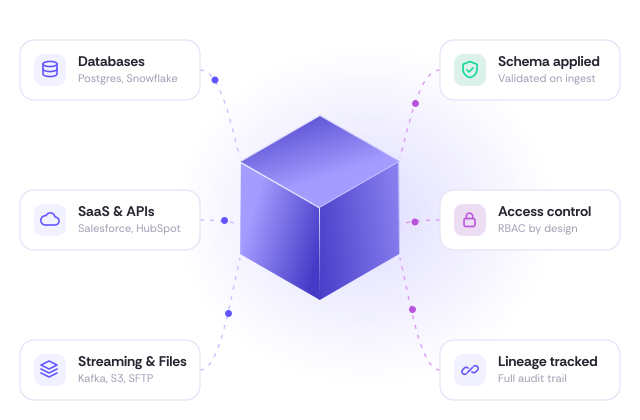
Every source you connect becomes a Nexset: a governed data product with its schema, metadata, lineage, and access rules attached. Nexsets handle structured, semi-structured, and unstructured data. Load the same Nexset into your warehouse, your BI tools, and your AI agents without building a new pipeline for each one.

Learn about Nexsets
Every Source Becomes a Governed Data Product

Built for Production ETL

No-Code Transforms

Filter, enrich, combine, map, and reshape data with pre-built rules or plain-English prompts. Add SQL, Python, or JavaScript when you need it, and preview the results at each step.

Built-in Data Quality

Nexla creates schema checks and quality rules for each source. When a source schema changes, Nexla detects the drift and keeps the pipeline running.

Governed Access

Share data products through a private marketplace with approval workflows. Access policies follow the data to every warehouse, dashboard, and AI agent.

FAQ

Common Questions About ETL

What is ETL?

ETL stands for extract, transform, and load. Data is pulled from source systems, cleaned and reshaped, then loaded into a destination such as a data warehouse, an application, or an AI agent.

Do I need to write code to build ETL pipelines in Nexla?

No. Build pipelines in the visual designer, or describe them in plain English with Express.dev. You can add SQL, Python, or JavaScript for custom logic.

Which sources and destinations does Nexla support?

Nexla has 1,000+ connectors for databases, SaaS apps, files, APIs, warehouses such as Snowflake, Databricks, and BigQuery, and on-premises systems.

How does Nexla handle schema changes?

Nexla detects schema drift at the source and updates the pipeline without breaking it. Quality checks run before the data is loaded.

Does Nexla support ELT?

Yes. When a project needs it, Nexla can load raw data first and transform it in the destination. Most teams start with ETL.