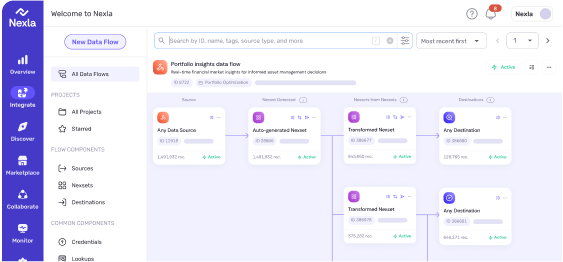
What is governed self-service data? Governed self-service data combines metadata-first controls with no-code access. Published data products include built-in definitions, approved joins, quality signals, and access policies—enabling business users to explore and transform data safely without metric drift or governance violations.
Metadata has shifted from back-office documentation to a core control layer in modern data stacks. Analysts estimate the metadata management tools market will reach $36.44B by 2030, while the data catalog market is expected to grow to $4.54B by 2032. The shift shows a growing need for data ecosystems built on a metadata-first approach.
However, as organizations scale, metadata alone isn’t enough. Data fragments across systems, and critical context is lost. Governed self-service closes this gap by publishing reusable, governed data products with built-in guardrails. Business users can then explore and transform data in no-code environments without metric drift or governance risk.
This article lays out a metadata-first blueprint for governed self-service and shows how Nexla operationalizes the pattern.
Key Takeaways
Self-service scales only when definitions, quality signals, and access rules travel with the data.
Metric drift happens when grain, joins, and logic aren’t explicit.
Governance fails when access is too restricted or too open.
Controlled self-service works by publishing governed data products with enforced reuse and validation.
Why Does Self-Service on Complex Datasets Turn Into Rework and Governance Risk?
Self-service analytics is essential because business teams are accountable for performance outcomes and need answers fast. It breaks on complex data because speed is easy to grant, but correctness and control are hard to preserve.
The definition of a metric rarely lives in a column name. It sits in hidden rules such as what a field includes, how code values should be interpreted, what time window applies, and what one row actually represents.
When that context is not attached at the point of use, two teams can make reasonable choices and still produce different numbers. They may then spend cycles reconciling instead of deciding.
Organizations usually respond in one of two ways. They either restrict access, pushing teams toward exports and spreadsheets with weak traceability, or widen access, which accelerates metric drift and uncontrolled sharing. In both cases, the same pattern repeats. More effort goes into rebuilding joins, filters, and fixes across multiple places than into using the data to act.
Likewise, reports can be right today and wrong tomorrow because source systems change. When fields, code sets, or refresh timing shift without a clear contract, lineage, or change signal, teams only notice after numbers stop matching and then fix the same issue across multiple dashboards and extracts.
How Does No-Code Metadata Intelligence Make Complex Data Safe for Business Users?
No-code metadata intelligence makes complex data safer for business users because it keeps meaning, quality expectations, and policy rules attached to the data while people work. Business definitions, approved join paths, ownership, and clear signals like freshness and completeness are captured once and shown at the moment users pick, join, and filter data.
The no-code interface then turns those guardrails into default-safe actions, so users can explore, transform, and share outputs without inventing new definitions, ignoring quality issues, or exporting unmanaged copies.
This only works as a pair. Metadata on its own becomes documentation that gets skipped, and no-code on its own scales inconsistent metrics and risky sharing. The following traditional and metadata-driven services differ across several critical dimensions.
Dimension
No-code, metadata-driven self-service
Traditional self-service
Data used
Governed data products with definitions and approved joins
Raw tables and ad-hoc extracts
Metrics
Standard definitions embedded in data
Definitions scattered and reinterpreted
Joins
Approved paths enforced
Joins guessed or copied
Data quality
Freshness, lineage, and issues visible
Quality issues found late
Governance
Policies enforced by default
Controls inconsistent or bypassed
Reuse
Governed, reusable outputs
Unmanaged copies and drift
Outcome
Faster, consistent KPIs
Faster short term, higher risk
Blueprint: Controlled Self-Service for Complex Data Using No-Code Metadata Intelligence
Self-service fails when rules are applied after data is shared. This blueprint embeds meaning, quality, and access controls into data products upfront, enabling reuse without redefining metrics or creating unmanaged copies.
Blueprint for governed self-service data processing
Step 1: Intake With Governed Connectors
Controlled connectors are the foundation of safe self-service. Assign an owner, define clear use cases, assess systems, objects, and refresh cadence, and default to least-privilege access for required fields. Standardize onboarding with templates and record connection context as metadata so it’s clear what was connected, why, and where it lands. This structured intake ensures that downstream processes start with consistent and well-defined data.
Step 2: Detect Schema Change Each Load
Even controlled intake cannot prevent silent changes in source systems. Maintaining an approved schema baseline and comparing each ingestion helps flag additions, drops, type, or key changes before they propagate.
Capture run signals such as row counts, null rates, distinct counts, and key integrity. Block breaking changes until versioned, review additive changes, flag suspicious shifts, and store plain change notes. This step ensures datasets remain reliable and prepares them for consistent interpretation downstream.
Step 3: Standardize Into Business-Ready Data
Once schema changes are visible, standardization ensures that all users interpret the dataset consistently. Define business meaning, valid values, and grain, and store approved join keys and aggregation guidance. Apply repeatable no-code transforms for code sets, time logic, and controlled mappings. Include short publish-time annotations covering definitions, intended use, and limitations so datasets carry clear guidance alongside their structure.
Step 4: Validate And Quarantine Errors
Even standardized datasets can contain defects. Validation rules with clear ownership, scope, and severity run each ingestion cycle across schema, types, fields, domains, key integrity, and freshness. Failing records are quarantined with detailed error information, and exceptions are explicit and time-bound. This step prevents bad data from silently propagating and ensures trust in published products.
Step 5: Enforce Access And Handling Rules
Governance works only when enforcement is automatic. Apply metadata-driven policies for sensitivity and sharing scope. Use request-based access routed to accountable owners. Detect and protect sensitive data. Maintain lineage from source to published products. Keep audit trails for publishing, access, and policy changes. Together, these measures create a controlled environment where self-service can scale safely.
Step 6: Publish Governed Data Products
With rules enforced and quality ensured, publishing governed data products enables teams to explore and reuse datasets safely. Require a minimum publish contract (owner, description, grain, freshness, sensitivity, intended use, limitations, join guidance). Provide discovery and request-based access to prevent side extracts, deliver into familiar business tools while enforcing protections, and support versioning and deprecation with clear change notes to prevent silent semantic forks.
How Nexla Implements the No-Code Metadata-First Blueprint in Practice
Nexla implements the blueprint by treating the governed data product as the unit of delivery. Teams define controls once at the product boundary, then reuse that same contract across consumers.
Step 1: Intake
Nexla gives data teams a faster way to connect new systems using 500+ bi-directional connectors, including REST and SOAP APIs. This speeds access to new sources and reduces reliance on spreadsheets.
Step 2: Learn
Nexla structures each ingestion into records, attributes, and schema, then checks every run for schema drift using Schema Change Detection. The point is to catch the moment a source changes, before that change turns into conflicting dashboards and a manual “what broke” investigation.
Step 3: Shape
Data shaping or transformation happens in the Nexset Designer, where teams standardize data and document the logic in the same place. That matters for self-service because business users should not have to guess what a field means or recreate the same filters and joins in every dashboard.
Step 4: Validate
Nexla uses Error Management to isolate bad records instead of letting them leak into shared datasets and reports. That keeps business reporting stable, because teams investigate exceptions in one place rather than chasing inconsistent numbers across multiple dashboards.
Step 5: Govern
Nexla offers business teams governance controls like approvals, centralized policies, PII tagging, masking and hashing, lineage, and audit logs. These features help keep governance attached to the data product, preventing reuse from turning into uncontrolled sharing.
The goal is repeatable, automated decisions on access, sharing, and sensitive data handling, without sending business teams back to ticket queues.
Step 6: Publish And Enable
Nexla uses the Private Marketplace to make governed data products easy to find and request without passing files around. For teams that live in spreadsheets, Nexsets for Google Sheets brings the governed dataset into Google Sheets, so users can work in a familiar place while the dataset remains managed at the source.
Next Step: Productize One Feed
Pick one high-value dataset and define a simple safe-use contract covering definitions, metrics, sensitivity, quality, and lineage. Standardize it in Nexla as a governed Nexset so all teams use the same approved version.
Keep it current with schema change detection and error quarantine, then publish it for reuse so new users can self-serve without rebuilding logic.
Want Business Users to Self-Serve Data Safely?
Schedule a demo to see how Nexla publishes governed, AI-ready data products with embedded metadata controls, enabling business users to explore and transform data in no-code environments while maintaining consistency and compliance.
FAQs
What is the smallest “governed data product” worth publishing first?
Choose a dataset that teams already share and dispute. Define grain, joins, metrics, freshness, sensitivity, and ownership. If you can’t explain it simply, it’s not ready.
How do you keep governance from turning self-service into another ticket queue?
Automate low-risk access. Require approvals only for sensitive or meaning-changing requests. Use metadata policies, time-bound access, and visible exceptions. The approved path must be faster than exports.
What is metric drift and how does it happen?
Metric drift occurs when the same business metric gets calculated differently across teams because grain, filters, time windows, or join logic aren’t standardized. Without explicit definitions traveling with data, each user interprets fields differently, creating conflicting dashboard numbers that require reconciliation.
How do you prevent metric drift in BI tools and spreadsheets?
Treat tools as interfaces, not sources of truth. Enforce reuse of governed products, approved metrics and joins, visible lineage, versioning, and clear change notes.
Why does traditional self-service analytics create metric drift?
Traditional self-service fails because definitions, grain, and join logic aren’t explicit in column names. Teams make reasonable but different choices, producing conflicting numbers. Without attached context, users reinvent definitions repeatedly, spending time reconciling metrics instead of acting on insights.
How do you prevent self-service from becoming a governance bottleneck?
Automate low-risk access with metadata-driven policies. Require approvals only for sensitive or meaning-changing requests. Use time-bound access, visible exceptions, and clear request paths. The approved governed product path must be faster than exports and spreadsheets to prevent shadow IT.
Turn Raw Feeds Into Reusable Data Products With Metadata-Intelligent Integration
Raw feeds without context create endless rework. This metadata-first blueprint shows how to turn changing source feeds into governed, reusable data products with automated validation, lineage, and GenAI-ready contracts.
From Raw Customer Feeds to Scalable, Reusable Data Products
Customer API and CSV feeds create engineering bottlenecks. Learn how to standardize raw customer data into governed, reusable data products using Common Data Models—eliminating custom integrations and scaling onboarding.
AI-Ready Data Checklist: Ten Things to Validate Before You Build an LLM Pipeline
Essential checklist for validating AI-ready data before building LLM pipelines. Learn the 10 critical steps ML teams must follow to ensure quality, freshness, and compliance.

 Express —